Office Relocation Checklist for San Jose Tech Companies

Tech companies in San Jose operate complex environments. A single office floor can house server racks, prototype labs, clean room equipment, cable-dense workstations, height-adjustable desks, and multi-monitor setups that took months to configure. Moving any of it carelessly causes downtime, data loss, and equipment damage that no company budget can handle well.

This checklist exists for exactly that kind of move. It covers every critical phase, and it is built around the specific realities of relocating a tech office in San Jose, one of the most infrastructure-heavy business environments in the country.

San Jose’s Tech Landscape: Know Your Zone Before You Move

Before planning the logistics, understand where your company sits in San Jose’s commercial map. Each district has its own building type, loading dock access, elevator constraints, and parking restrictions, all of which affect how your move is executed.
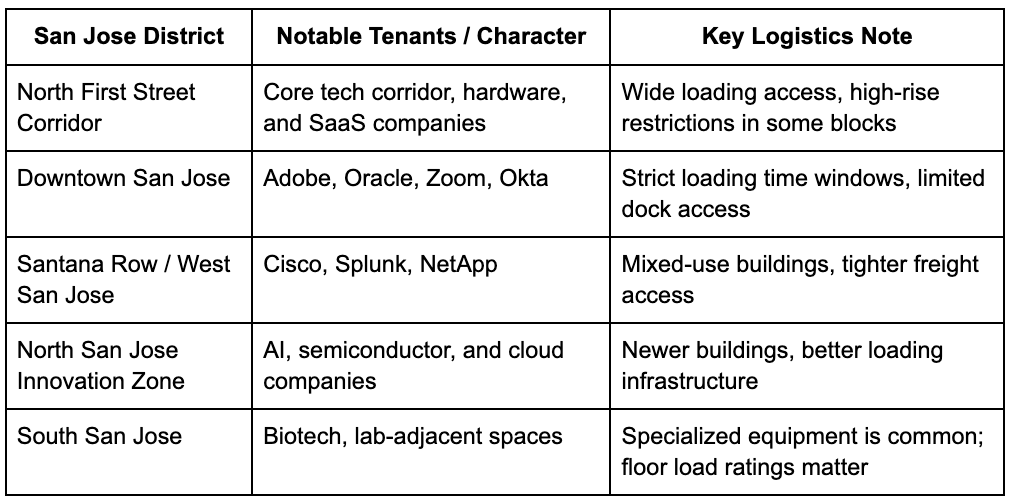
San Jose's Tech Landscape

Talk to your office movers in San Jose, CA, early, so they can assess building-specific constraints at both your origin and destination addresses.

The Master Office Relocation Checklist for San Jose Tech Companies


Phase 1: 8-12 Weeks Before Move Day

Company and Lease

  • Notify your landlord and review your lease exit terms.
  • Confirm your new lease start date and access schedule.
  • Get written confirmation of loading dock availability at both locations.
  • Check if your new building has after-hours freight elevator access.

Internal Planning

  • Assign a dedicated move coordinator (not IT, not HR, a dedicated point of contact)
  • Create a department-by-department inventory of all assets.
  • Document your current network topology, cable runs, and server room layout with photos.
  • List all software licenses and verify their transferability.
  • Identify which equipment requires special handling: servers, UPS units, lab instruments, and clean room tools.

Vendor Coordination

  • Contact your ISP at least 60-90 days in advance to schedule a service transfer or new line installation.
  • Notify your phone system provider, VoIP carrier, and cloud vendors.
  • Schedule a site assessment at the new location with your IT team and your moving company.
  • Order any missing Cat6 cabling, power outlets, or rack mounting hardware early.

Phase 2: 4-8 Weeks Before Move Day

IT Infrastructure Preparation

Furniture and Ergonomic Equipment

  • Inventory all standing desks and adjustable workstations: many require full disassembly.
  • Check that the new-location floors support the weight of the loaded height-adjustable desk frames.
  • Measure doorways, corridors, and elevator dimensions in the new building.
  • Confirm that your office movers in San Jose, CA, have experience with standing desk systems and modular furniture.

Lab Equipment and Specialized Assets

  • Identify all equipment that requires climate-controlled transport (oscilloscopes, calibrated instruments, precision hardware)
  • Check the manufacturer’s transport specifications for each sensitive device.
  • For cleanroom equipment, coordinate with a specialist on contamination-prevention protocols during the move.
  • Document serial numbers and calibration records before disconnecting anything.

Phase 3: 1-4 Weeks Before Move Day

Communication Plan

  • Send a company-wide move schedule with clear dates, timelines, and the tasks each team needs to complete.
  • Brief department heads on what stays, what moves, and what gets recycled or donated.
  • Confirm that remote employees and contractors are aware that their systems may experience a brief outage window.
  • Update your business address with vendors, banks, insurance providers, and the state of California.

New Office Readiness

  • Walk the new space with your IT team and your moving company’s project manager.
  • Confirm power outlet placement matches your workstation floor plan.
  • Verify server room ventilation, cooling capacity, and physical security.
  • Test internet connectivity before move day, not on move day.
  • Install any new cabling infrastructure at least two weeks before equipment arrives.

Packing and Labeling

  • Pack workstations by department with color-coded labels that correspond to the new floor plan.
  • Bag, label, and zip-tie all cables separately from hardware.
  • Use double-walled boxes for monitors and laptops.
  • Pack servers only in anti-static foam or the original manufacturer’s casing.
  • Never pack hard drives loose; use padded, rigid containers.


Phase 4: Move Day Execution

On-Site Management

  • Keep a printed copy of the floor plan at both locations for movers to reference.
  • Station a point of contact at the origin and another at the destination.
  • Have IT staff on-site to supervise the loading and unloading of server and network equipment.
  • Do not plug in servers or networking equipment until your IT team confirms power stability at the new location.

Critical Equipment Protocol

  • Move servers and rack units on dedicated, padded dollies.
  • Transport hard drives and storage arrays separately in a climate-controlled vehicle.
  • Load clean room equipment last so it unloads first and moves directly into a controlled staging area.
  • Log each asset against your inventory list as it goes onto and off the truck.

Phase 5: Post-Move (First 72 Hours)

  • Power up servers and test network connectivity before staff arrive.
  • Verify every workstation reconnects to the correct network and has access to shared drives.
  • Test VoIP lines and confirm phone numbers forwarded correctly.
  • Run a floor-by-floor walkthrough with department leads to confirm no items are missing or damaged.
  • File any damage claims with your moving company within the timeframe specified in your contract.
  • Update your IT documentation to reflect the new office layout, IP assignments, and cable runs.
  • Schedule a post-move review meeting at the 30-day mark to catch lingering issues.

Quick-Reference Checklist

Print this out and check off each item as you move.

Reference Checklists

Move Day and Post-Moving

Special Note: E-Waste Recycling During Your Move

Office relocations in San Jose generate significant electronic waste. Retired monitors, old server components, outdated networking hardware, and broken peripherals cannot simply be placed in general waste bins in California. 

Priority One Logistics offers e-waste recycling services across San Jose, Milpitas, and Fremont, including free pickup for businesses disposing of large volumes of equipment. Building this into your move timeline keeps you compliant and avoids last-minute disposal headaches.

How Priority One Logistics Handles San Jose Tech Office Moves

Priority One Logistics brings over 25 years of commercial moving experience to tech office relocations across San Jose and the wider Bay Area. The team handles office furniture, IT equipment, server and data center moves, and specialized assets, all under one roof. They are licensed by the California Public Utilities Commission (CSLB #115575) and work with businesses across North First Street, downtown San Jose, Santana Row, and every major commercial corridor in the region.

Their services include:

  • Office Relocation: Full-service moves for startups, mid-sized tech firms, and corporate headquarters
  • Data Center Relocation: Secure server and rack transport with minimal downtime planning
  • Office Furniture Solutions: Disassembly, transport, and reinstallation of standing desks, modular systems, and cubicles
  • Warehouse and Storage: Short and long-term storage for equipment that cannot move on the same timeline as the office
  • E-Waste Recycling: Responsible disposal and free pickup for high-volume business e-waste

Call (408) 684-2220 or request a quote at p1logisticservices.com to get a customized move plan for your San Jose office.

Frequently Asked Questions (FAQs)

Q 1: How do tech companies move servers and IT equipment safely during an office relocation?

Tech companies safely move servers and IT equipment by using anti-static packing materials, climate-controlled transport, labeled cable systems, padded server dollies, and detailed inventory tracking. Most San Jose tech offices also schedule full data backups and IT supervision before moving critical infrastructure to avoid downtime or data loss.

Q 2: How far in advance should a San Jose office relocation be planned?

A San Jose tech office move should ideally be planned 8–12 weeks in advance. This gives enough time to coordinate internet transfers, loading dock access, server room preparation, workstation documentation, furniture disassembly, and employee communication before move day.

Q 3: What is the biggest challenge during a tech office move in San Jose?

The biggest challenge during a San Jose tech office relocation is minimizing operational downtime while safely transporting sensitive IT infrastructure. Problems commonly include server disruptions, cable mismanagement, loading dock restrictions, elevator scheduling, and improper handling of expensive equipment.

Q 4: Do office movers in San Jose handle e-waste recycling for tech companies?

Yes, many professional office movers in San Jose offer e-waste recycling services for retired monitors, networking hardware, old servers, cables, and electronics. California has strict e-waste disposal regulations, so businesses often use licensed movers that provide compliant recycling and pickup services during office relocations.